

Airflow 3.4.0 arrived while I was preparing a talk for Apache Airflow & Apache Magpie Meetup. I’ve been adding an LLM to a product catalog enrichment pipeline, so the changes to repeated execution and model call records caught my attention first.
This release changes both how workflows are written and how they are operated. Task Loops can repeat a task group until a condition is met, and complete DAGs can now be written in TypeScript, Java, and Go as well as Python. There is also YAML-based DAG authoring and a folder navigation panel, alongside changes to defaults that affect existing workflows, including Asset event handling. I went through the official announcement and versioned documentation to put together this overview.
#The main changes at a glance
| Area | Change in 3.4.0 | What it lets you do |
|---|---|---|
| Repeated execution | Task Loops | Pass results between iterations of a task group and inspect each iteration’s execution history. |
| DAG authoring | Dag Importer and SDKs | Define a complete DAG, including its schedule, tasks, and dependencies, in TypeScript, Java, or Go. YAML definitions are also supported. |
| Navigation and UI | Folders and iteration views | Find DAGs through the bundle’s folder structure and inspect individual loop iterations. |
| AI usage | AI Model tab | View model names, token usage, and estimated costs recorded by the Common AI provider. |
| Event handling | Runs per Asset event | By default, a single Asset or an OR expression produces one DAG run per event. |
| Pausing execution | draining state | Stop new automatic runs and let existing runs finish before pausing. |
The AI usage features in the table come from the Common AI provider, which is released separately from Airflow core. @task.llm, agent tool calls, and human approval were already available; in 3.4, they can be combined with Task Loops to build iterative workflows. The provider’s AI Model tab is also available on Airflow 3.4 and later, making model usage easier to inspect in the UI.
#Managing iteration with Task Loops
Some workflows cannot know their iteration count in advance. An API response may contain the URL of the next page, or validation feedback may require another revision to generated output. Task Loops let you put that work in a @task_group and repeat it with .loop(). A max_iterations limit is required. An optional until condition stops the loop as soon as it becomes true, even before that limit is reached.
The diagram shows a generation and review workflow. Feedback from the first review becomes input to the next generation step, and the second review satisfies the exit condition. Airflow keeps task states and logs for each iteration, so the results can be inspected separately.
The loop body runs before the exit condition is checked, so it always runs at least once. From the second iteration onward, tasks can read the previous result through loop.previous, while the exit condition examines the current result through loop.result. Airflow creates task instances for another iteration only when the decision requires one. The repetition is managed at runtime without introducing a cycle into the DAG’s dependencies.
Reaching the limit has different consequences depending on how the loop is configured. If an until condition remains unsatisfied, the final exit-decision task fails. A loop configured only with an iteration count completes normally after that many iterations. Returning a LoopDecision from the exit condition can also record a reason, which the execution view can show when explaining why the loop continued or stopped.
Passing feedback into subsequent work serves a different purpose from retries or dynamic task mapping. The choice depends on the work being done.
| Required behavior | Feature |
|---|---|
| Try an API call again after a transient failure. | Task retries |
| Process each item in a product list that is already available. | Dynamic task mapping |
| Use review feedback as input to the next round of work. | Task Loops |
Iterations run sequentially, while independent tasks within an iteration can run in parallel or be dynamically mapped. Nested loops, loops inside mapped task groups, and dynamic mapping of an entire loop are not supported. For example, mapping a separate generation-and-review loop over every product in a list is not currently supported.
#Writing complete DAGs in TypeScript, Java, and Go
The Java and Go SDKs introduced in Airflow 3.3 let developers implement individual tasks in other languages inside a DAG declared in Python. In 3.4, that scope expands to the whole DAG: the schedule, task definitions, and dependencies can be written in TypeScript, Java, or Go. A separate Python file to declare the DAG is no longer necessary in this setup.
For a Java pipeline that reads, transforms, and stores data, Java code can now define not only each operation but also its daily schedule and execution order. Task groups and conditional branches can be expressed through the SDK too. This is useful for teams that want to maintain their services and workflows in the same language. The Airflow Beyond Python talk also describes teams running DAGs written in different languages within a single Airflow deployment.
The connection to Airflow is provided by Dag Importer, an extension point for reading formats other than Python files. The language SDKs and the YAML importer use this mechanism.
For deployment, the artifacts produced by each SDK go into a DAG bundle. The DAG processor executes them to read the DAG definitions, which the scheduler and UI then manage in the same way as Python DAGs. The artifact and runtime requirements depend on the language.
| Language | Artifact in the DAG bundle | Required on the DAG processor and workers |
|---|---|---|
| TypeScript | A .min.mjs file with bundled dependencies | Node.js 22 or later |
| Java | A JAR containing its dependencies | A Java runtime |
| Go | An executable built for the target OS and CPU | No separate Go runtime |
After deploying the files, you need to register a coordinator for the language and associate the DAG’s task queue with it. This configuration is needed on both the DAG processor and workers. Airflow still manages schedules and state, while the deployment must provide the environment needed to read the code and execute its tasks.
YAML is another option if you want to declare a DAG in a configuration file. The schedule and dependencies are defined in YAML, with Python operators or code tasks attached to them. The YAML definition itself requires no build step, but its importer must be registered separately. The 3.4.0 release notes mark Dag Importer and the language SDKs as experimental, so API changes remain a consideration when adopting them.
#Finding DAGs and inspecting their execution
The UI changes make sources and execution flows easier to navigate. The new Folders panel in the DAG list shows the directory structure within bundles. Selecting a folder filters the list to DAGs under that path, letting you narrow down a large collection by its existing structure.
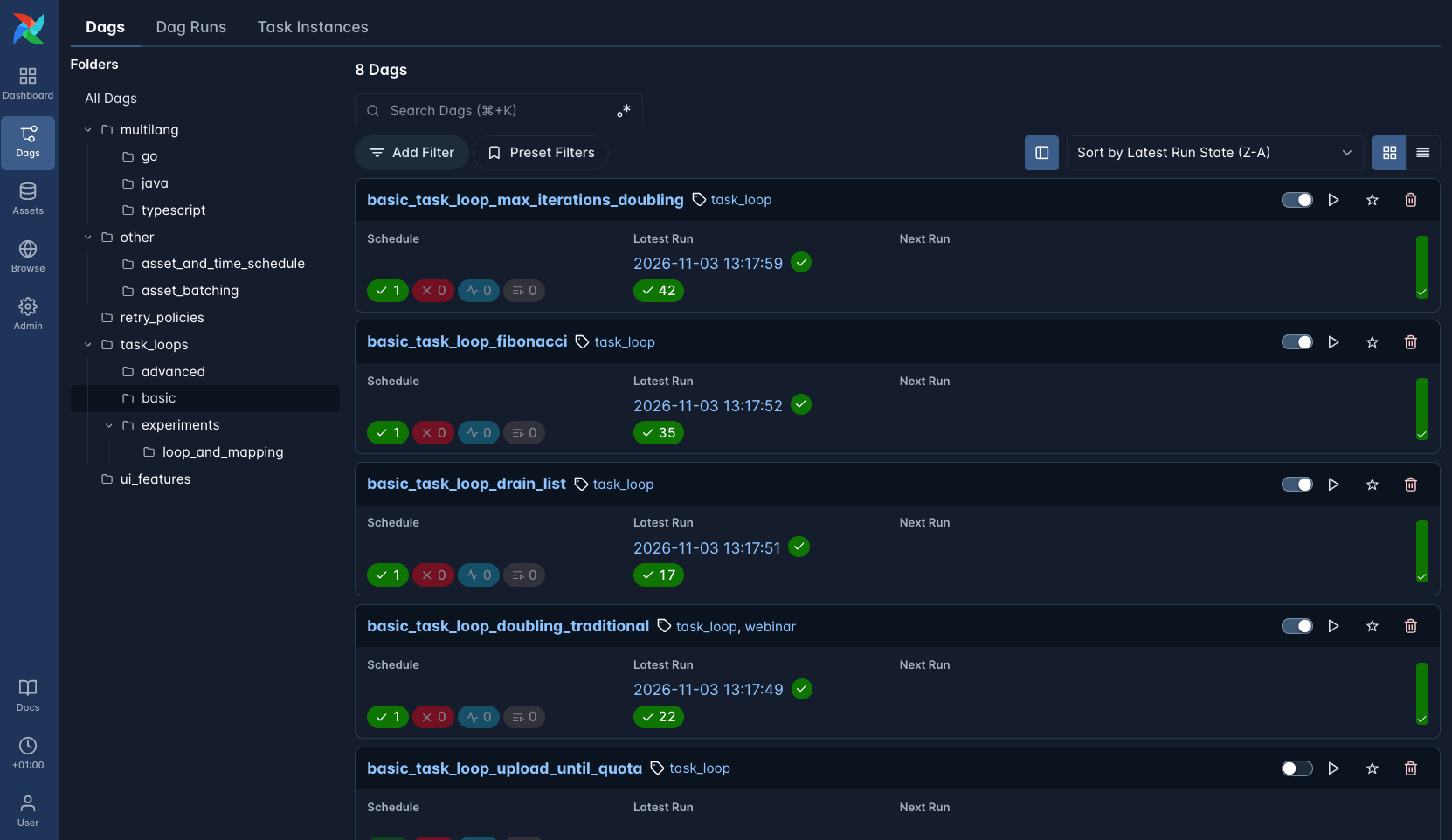
Screenshot: Apache Airflow 3.4.0 announcement.
Inside a DAG, the code view can show source in its authoring language. Task Loops also gain views for individual iterations and task history, making it easier to locate a failure in a particular iteration. If the exit condition records a reason for its decision, that reason is visible too.
The Common AI provider’s LLM and agent tasks offer an AI Model tab on Airflow 3.4 and later. It shows the model name, token usage, and estimated cost. These values come from the most recent attempt’s usage stored in XCom; they are not a total across all retries and iterations. The provider’s OpenTelemetry integration can trace individual model calls and tool executions. That instrumentation is experimental.
There is also a new draining state for pausing a DAG after its current work finishes. It prevents new scheduled and Asset-triggered runs while letting queued and running DAG runs continue. Once the remaining runs finish, the DAG becomes paused automatically. Explicitly requested manual runs are still allowed while it is draining.
#Asset handling and upgrade implications
For an existing deployment, the unit of Asset event processing deserves an early check. An Asset represents a data resource produced or awaited by a DAG, and updates to that resource can trigger another DAG. In 3.4, the default for a single Asset or an OR expression changes from consuming accumulated events together to creating a DAG run for each event. Three pending events for one Asset therefore produce three runs by default.
To keep the previous batching behavior, set batch_asset_events=True in the timetable or scheduler configuration and reparse the DAG. AND expressions that wait for multiple Assets, among other cases, retain batching by default, so the impact depends on the schedule expression in use.
Runtime and storage changes also need to be checked against the deployment’s configuration. These are the main compatibility changes I picked out from the 3.4.0 release notes.
| Item | Change | What to check before upgrading |
|---|---|---|
| Python | Support for 3.10 ends; 3.11–3.14 are supported | Runtime environments and dependencies |
| PostgreSQL | The default metadata database driver changes to psycopg3 | Connection strings and driver-specific settings |
| Containers | Based on Debian 13 and Docker Hardened Images | Custom images with additional system packages |
| Clearing tasks | Clearing an individual task also clears its state-store records by default | Use keep_task_state=True to preserve state. Automatic retries continue to retain it. |
| XCom backends | A storage interface that distinguishes loop iterations | Implement store_value in custom backends. The common.io object-storage backend requires version 1.11.0 or later. |
| Downgrades | New XCom values are stored in xcom_v2 | Downgrading to a version before 3.4 requires copying data, so test recovery time. |
The release gives me a few more things to investigate in the product catalog enrichment experiment. I plan to upgrade the environment to 3.4.0, check the behavior in detail, and test the changes that affect the pipeline for my talk. In particular, I want to express the handoff of validation feedback to the next iteration with Task Loops and compare its execution records with the current implementation.
Astronomer is also preparing a What’s New in Apache Airflow 3.4 webinar for December 10. I plan to cover my hands-on results and what I learn from the webinar in a separate post.
#References
- Apache Airflow 3.4.0 announcement, Rahul Vats, November 6, 2026. Introduces Task Loops, multi-language DAGs, and UI changes with examples.
- Airflow 3.4.0 release notes. Documents feature support and compatibility changes affecting existing workflows.
- Airflow Beyond Python, Jason Liu and Wei Lee, October 11, 2026. A talk on DAG authoring and deployment in multiple languages ahead of 3.4.
- Common AI provider observability. Explains usage values in the AI Model tab and the scope of OpenTelemetry tracing.
- Common IO 1.11.0 changelog. Describes the object-storage XCom backend changes for Task Loops.